This is going to be tricky, as teachers are random creatures. They will take content in whatever form they can find it, and show it to their students. I still remember a teacher offering me a DVD to show to my class, that had been copied from VHS video tape, which was filmed on a camcorder, of a filmstrip from the 50s. Seriously. Primitive Pete. Look it up.
So we will need to support many different types of media.
There is the obvious:
DVD is a must
CD is a must
MP3 would be nice, as would iPod support
After that, FLV playback would be welcomed, along with avi, mpeg4, wav, ogg, flac, wmv, wma, and many many other formats.
The problem with many of these, is that you cannot really distribute them as part of your operating system out of the box. Microsoft pays a pretty penny to do so, and passes the anti-savings on to you.
So in order to keep Linux free, we will have to add these afterwards.
For video, you really can't go wrong with VideoLan Client, or VLC for short. Sure, its not a gorgeous interface out of the box, but it will play anything. Seriously. Wma, Wmv, mpeg 1, 2, 3, 4, dvd, cd, avi, qt, real, whatever you got, it'll play.
For audio playback of single files, VLC will work, but if you want a nice directory of music: A la Itunes, you need something more robust. Rhythmbox is the standard, and is ipod friendly, and recently Songbird was released, which appears to be taking the world by storm.
I'm going to start with both installed, and favor using Songbird for the time being.
Wednesday, January 7, 2009


THE INTERNETS, I HAVE THEM
Ok, so an internet browser is a pretty straightforward choice.
And it is Firefox.
"BUT WAIT!" the crowds cry! "I USE INTERNET EXPLORER!"
Get over it. IE7 just got around to implementing features that were decided upon as standards 5 YEARS ago. YEARS.
Yes, there might be a website or two that don't display things exactly the way you'd rather they be displayed. For every page like that, I'll show you three features that lead to more productivity, and greater ease of use.
Security is the main reason I went to Firefox years ago, but that's a hard sell for most users. Security is invisible for most users. They don't know a system is insecure until it is too late.
But there are now candy options for the average user.
My top 5?
And it is Firefox.
"BUT WAIT!" the crowds cry! "I USE INTERNET EXPLORER!"
Get over it. IE7 just got around to implementing features that were decided upon as standards 5 YEARS ago. YEARS.
Yes, there might be a website or two that don't display things exactly the way you'd rather they be displayed. For every page like that, I'll show you three features that lead to more productivity, and greater ease of use.
Security is the main reason I went to Firefox years ago, but that's a hard sell for most users. Security is invisible for most users. They don't know a system is insecure until it is too late.
But there are now candy options for the average user.
My top 5?
- Adblock. A plugin that blocks out annoying ads, and leaves pages without blinking, shouting, music playing, obnoxious billboards.
- Tabbed Browsing. Yes, IE7 now has tabbed browsing, but seeing as Firefox has been doing it for three times as long, they are better at it. Cool features like "Undo close tab" have been worth the cost of admission alone.
- VideoDownloadHelper. Simply pull down flash videos to save on your harddrive without the annoyance of Keepvid or other malarky.
- Foxmarks. It syncronizes my bookmarks without a del.ici.ous or anything else required, so if I bookmark a website on any of my computers, it will show up on all of them.
- Zotero. A SUPER handy research assistant that provides perfect citations for the pages you are on, and makes sure to keep a good log of what research you are doing.
Office Suite (sweet)
There are a few different free office suites. An office suite should contain a few things for most users. Most users typically will use a word processor, and a slide presentation software. Slightly less popular, but still in wide use is a spreadsheet software.
A la Microsoft Word, PowerPoint, and Excel.
There are two main branches to go with this: Internet and non-internet. AKA the cloud dilemma.
The Web 2.0 movement has suggested that every single piece of info be stored on servers out on the web, and when we want to look at it or edit it, we go out and get it from the web, and nothing is stored locally. Interestingly enough, Bill Gates predicted that by the late 90s, no one would have hard drives anymore, and that programs, data, media, etc would all be stored on the net, and we would merely have "dummy" terminals.
Missed the mark a little, Bill. But he'll be laughing all the way to the bank.
Advantages of Cloud Computing:
So enough. Users are going to have to choose one or the other (or not I guess. They could use both. There are no cloud computing police. Yet.). For offline office suites, you can't do much better than OpenOffice.Org. "HEY, YOU CAN'T FOOL ME, THERE'S ONE OF THEM DANG DOT ORGS IN THURR! THAT'S A WEBSITE!"
I'm not certain of the logic behind naming your piece of software after your website, but hey, I'm not making the software, so I don't get to criticize. So OpenOffice.org has all the trimmings of a major commercial product. Since vague ideas aren't copyrightable (thank goodness), when a neat feature is introduced into a commercial product, it is only a matter of time before the feature is tested and applied to the free, open-source software.
OpenOffice.org will be used for this test as the Offline word processor, spreadsheet, and slide presenter.
For the Cloud Computing varient, there are even more choices.
Google Docs has the google juggernaut behind them, and it is difficult to overestimate their reach. With integrated calendars, websites, email, and web applets, Google has made a really nice experience for many facets of the web, and they make a habit of giving most of it away for free.
Zoho is another great suite of applications. They have a LOT more going on at the moment from CRM solutions to online database managers. There is probably more here than you need, but that's not a bad thing.
So there is a solution for you here, and it may just be a matter of trying one out and seeing what pushes your buttons.
A la Microsoft Word, PowerPoint, and Excel.
There are two main branches to go with this: Internet and non-internet. AKA the cloud dilemma.
The Web 2.0 movement has suggested that every single piece of info be stored on servers out on the web, and when we want to look at it or edit it, we go out and get it from the web, and nothing is stored locally. Interestingly enough, Bill Gates predicted that by the late 90s, no one would have hard drives anymore, and that programs, data, media, etc would all be stored on the net, and we would merely have "dummy" terminals.
Missed the mark a little, Bill. But he'll be laughing all the way to the bank.
Advantages of Cloud Computing:
- Your information is with you even if your computer isn't.
- If your local hardware kicks the bucket, your data is not lost
- It is much easier to collaborate with others on those files
- Less local hardware needed. Less harddrive space and processing power
- It makes you look all hip and trendy
- It is only as fast as the net connection you have.
- It is only as reliable as the net connection you have.
- If the host server hardware kicks the bucket, your data is lost.
- Dealing with large files can be timely as upload speeds are still slow.
- The interface may not be what you are used to
So enough. Users are going to have to choose one or the other (or not I guess. They could use both. There are no cloud computing police. Yet.). For offline office suites, you can't do much better than OpenOffice.Org. "HEY, YOU CAN'T FOOL ME, THERE'S ONE OF THEM DANG DOT ORGS IN THURR! THAT'S A WEBSITE!"
I'm not certain of the logic behind naming your piece of software after your website, but hey, I'm not making the software, so I don't get to criticize. So OpenOffice.org has all the trimmings of a major commercial product. Since vague ideas aren't copyrightable (thank goodness), when a neat feature is introduced into a commercial product, it is only a matter of time before the feature is tested and applied to the free, open-source software.
OpenOffice.org will be used for this test as the Offline word processor, spreadsheet, and slide presenter.
For the Cloud Computing varient, there are even more choices.
Google Docs has the google juggernaut behind them, and it is difficult to overestimate their reach. With integrated calendars, websites, email, and web applets, Google has made a really nice experience for many facets of the web, and they make a habit of giving most of it away for free.
Zoho is another great suite of applications. They have a LOT more going on at the moment from CRM solutions to online database managers. There is probably more here than you need, but that's not a bad thing.
So there is a solution for you here, and it may just be a matter of trying one out and seeing what pushes your buttons.
What software will I need?
Ok, so here is a list of all the software that I will need for a successful teacher pc.
First things first, I will need an operating system. This computer in installed with Windows XP Professional: Tablet PC edition, with Service Pack 3 installed.
The retail price of that piece of software is about $150.
The major commercial software alternative is MacOSX. While cheaper (~$100) it's still not cheap in a world of $300 computers.
So we are left with the only really free option. Linux.
Did you hear that? That was the sound of a million hairs going up on a million necks all at once.
Yep, linux has a bad rap. And I'll admit, it's a well-deserved bad rap. I started working with linux many years ago, in it's relative adolescence, and it was overwhelming for me, and I'm not easily overwhelmed by complicated computery.
At the time, linux users were pleased as punch to scare the average user.
Screens like this one:

 made peoples' teeth fall out. And that was just how the linux users liked it. It was a renniessence of a time when computers were used by hobbiests and researchers, and those who could use them were part of an elite cadre.
BUT THAT WAS THEN!
And this:

...is now
People saw that linux can be that tool for the uber1337 hacker types, but it can also be a fantastically stable, secure, attractive, EASY TO USE, and (wait for it) FREE alternative for Joe Everyman.
More to come.
- An Operating System
- Office Suite
- Internet Browser
- Media Player
- Email Client
First things first, I will need an operating system. This computer in installed with Windows XP Professional: Tablet PC edition, with Service Pack 3 installed.
The retail price of that piece of software is about $150.
The major commercial software alternative is MacOSX. While cheaper (~$100) it's still not cheap in a world of $300 computers.
So we are left with the only really free option. Linux.
Did you hear that? That was the sound of a million hairs going up on a million necks all at once.
Yep, linux has a bad rap. And I'll admit, it's a well-deserved bad rap. I started working with linux many years ago, in it's relative adolescence, and it was overwhelming for me, and I'm not easily overwhelmed by complicated computery.
At the time, linux users were pleased as punch to scare the average user.
Screens like this one:
 made peoples' teeth fall out. And that was just how the linux users liked it. It was a renniessence of a time when computers were used by hobbiests and researchers, and those who could use them were part of an elite cadre.
BUT THAT WAS THEN!
And this:
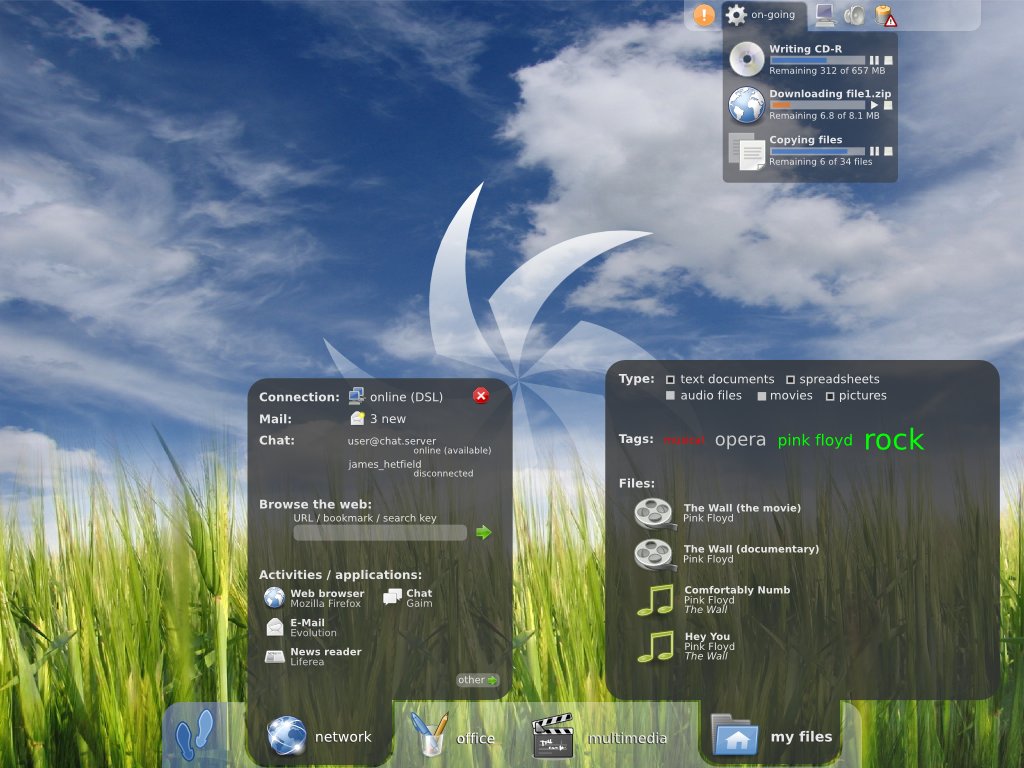
...is now
People saw that linux can be that tool for the uber1337 hacker types, but it can also be a fantastically stable, secure, attractive, EASY TO USE, and (wait for it) FREE alternative for Joe Everyman.
More to come.
The great linux tablet experiment of aught nine!
After having my laptop FINALLY blasted (my delay, not the tech staff) I decided it was time for a minor experiment.
Computing has gotten to the point where the hardware expense is now equal to or less than the cost of the software that is running on it. This is ridiculous. It is a layover from a time when information was easily quantified, meted out and sold. It used to make sense. You would know a bunch about a subject, write a book, people would buy that book, and they would be paying mostly for the cost of the book, and just a little more for your particular expertise.
Now, in a technological era, where vast amounts of information can duplicated for virtually free, we are still charging for something that has no nominal value. Luckily, there is a strong movement in the world to change the way in which we buy and sell software. Specifically, that we DON'T buy or sell software. Software is merely code that has been written, and is easily duplicated. That should be free, and trying to prohibit people from copying the software leads to arcane key management schemes, copy protection issues (rootkits, sony, tsk tsk) and a myriad of other issues. This reminds me of the War of the Currents between Nikola Tesla and Thomas Edison. Tesla's alternating current technology was one of the largest paradigm shifts in history, and Edison spent a better part of his life trying to squash the technology merely because it cut into his bottom line. It set the nation back decades, and if Tesla had been able to continue his high energy work, we may have been able to provide low cost electricity to the remote parts of the world long ago.
To make a long story short (TOO LATE), I support free software. Software that is written by people who want to share their knowledge and creations with others. The current software model is like charging people millions of dollars for an art masterpiece, and also charging millions of dollars to have prints of the painting in their living room.
There are many free software suites, and although many of them lack the "flash" and panache of more polished paid software, you really question "is it necessary?"
This was motivated by the decision to take OpenOffice.org and the Gimp software off the computer image. These are alternatives for Microsoft Office and Adobe Photoshop.
I will run this experiment for the remainder of the year, and only use free (and preferably open-source) software on my laptop for work. I will see if it is possible, and indeed how hard it would be to save hundreds on software.
Computing has gotten to the point where the hardware expense is now equal to or less than the cost of the software that is running on it. This is ridiculous. It is a layover from a time when information was easily quantified, meted out and sold. It used to make sense. You would know a bunch about a subject, write a book, people would buy that book, and they would be paying mostly for the cost of the book, and just a little more for your particular expertise.
Now, in a technological era, where vast amounts of information can duplicated for virtually free, we are still charging for something that has no nominal value. Luckily, there is a strong movement in the world to change the way in which we buy and sell software. Specifically, that we DON'T buy or sell software. Software is merely code that has been written, and is easily duplicated. That should be free, and trying to prohibit people from copying the software leads to arcane key management schemes, copy protection issues (rootkits, sony, tsk tsk) and a myriad of other issues. This reminds me of the War of the Currents between Nikola Tesla and Thomas Edison. Tesla's alternating current technology was one of the largest paradigm shifts in history, and Edison spent a better part of his life trying to squash the technology merely because it cut into his bottom line. It set the nation back decades, and if Tesla had been able to continue his high energy work, we may have been able to provide low cost electricity to the remote parts of the world long ago.
To make a long story short (TOO LATE), I support free software. Software that is written by people who want to share their knowledge and creations with others. The current software model is like charging people millions of dollars for an art masterpiece, and also charging millions of dollars to have prints of the painting in their living room.
There are many free software suites, and although many of them lack the "flash" and panache of more polished paid software, you really question "is it necessary?"
This was motivated by the decision to take OpenOffice.org and the Gimp software off the computer image. These are alternatives for Microsoft Office and Adobe Photoshop.
I will run this experiment for the remainder of the year, and only use free (and preferably open-source) software on my laptop for work. I will see if it is possible, and indeed how hard it would be to save hundreds on software.
Tuesday, June 3, 2008
What can I say, when I'm right...
I'm right.
I put my tablet PC in it's case after telling it to standby, and then I went into Target to do a little shopping for graduation (you know, 24 pack of water here, 50' coaxial Rg6 cable there, the usual.). I was in Target for about 25 minutes, and when I returned, I went to grab my tablet out of it's case. In the words of our dearly departed Harry, HOLY COW! The fan was loud as all get out, obviously working overtime. It was physically hot to the touch, and when I opened up SpeedFan, it had charted a spike up to 58 degrees C (136.4 degrees F) for the core. The hard drive sensors, and the two CPU monitors also spiked. I took it out, and let it cool down, and the spikes gradually decreased. I would not be surprised in the least if this is what is taking out laptops. I'm glad I caught it in time, as there have been no signs of hard-locks.
It wouldn't be a bad idea to have the program running, and then set to email the technology staff when the alarm temperature is surpassed.
I put my tablet PC in it's case after telling it to standby, and then I went into Target to do a little shopping for graduation (you know, 24 pack of water here, 50' coaxial Rg6 cable there, the usual.). I was in Target for about 25 minutes, and when I returned, I went to grab my tablet out of it's case. In the words of our dearly departed Harry, HOLY COW! The fan was loud as all get out, obviously working overtime. It was physically hot to the touch, and when I opened up SpeedFan, it had charted a spike up to 58 degrees C (136.4 degrees F) for the core. The hard drive sensors, and the two CPU monitors also spiked. I took it out, and let it cool down, and the spikes gradually decreased. I would not be surprised in the least if this is what is taking out laptops. I'm glad I caught it in time, as there have been no signs of hard-locks.
It wouldn't be a bad idea to have the program running, and then set to email the technology staff when the alarm temperature is surpassed.
Thursday, May 29, 2008
More temperature work.
Motherboard monitor 5 was a bit of a bust, it didn't seem to pick up the motherboard sensors.
Speedfan seems to work well, and I am currently running it and charting the HDD temp, the Cpu Temp, and "Remote Temp 1" whatever that is.
Temp 1 has been pretty much rock solid at 42 degrees C, which leads me to believe that it might be a false reading.
The HDD temp has been all over the map from a low of 25 degrees to a high of 33.
The Cpu temp has wavered only slightly up to 38-39 when under load. At idle, it sits at 37 degrees.
Ironically, that is the temperature of the human body.
Speedfan seems to work well, and I am currently running it and charting the HDD temp, the Cpu Temp, and "Remote Temp 1" whatever that is.
Temp 1 has been pretty much rock solid at 42 degrees C, which leads me to believe that it might be a false reading.
The HDD temp has been all over the map from a low of 25 degrees to a high of 33.
The Cpu temp has wavered only slightly up to 38-39 when under load. At idle, it sits at 37 degrees.
Ironically, that is the temperature of the human body.
Subscribe to:
Posts (Atom)
